Give it a name. Make some room.
Your people. Your apps. Your AI cat.
Good company.
Great ideas.
One clever cat.
The chat is only the beginning. Give the idea a plan, the plan a home, and your people a place to make it happen—with Vitto alongside.
For the big launch, the Saturday match and the plans that start with “hear me out.”

Meet Vitto
Meet the possibilities. Explore how Vitto works.
Your newest team member. Meow.
People, apps, computers. Finally hanging out together.
Your team has enough tabs open.
Let’s open some possibilities.
YOUR HOST HAS WHISKERS
Pick a little adventure.
Let’s make it happen.
Take a guided look at three ways to use Vitto. These illustrated stories show how conversations, Walls and Desks work together.

VITTO / A LITTLE GUIDED TOUR01 / 04
Launch SpaceThe spark
YOUR TEAM + VITTO
“What if we launched that idea?”
I’m listening. Big idea or wildly big idea?
Something we can shape together.
One small move toward launch day.
together ✳
“You bring the idea. I’ll bring the paws.”
Interactive demo · nothing is sent or saved to your accountEvery good thing
starts with a “what if.”
Bring your people into the conversation. Pick a story above and give Vitto something to get curious about.
Try it. No sign-up, no actual launch deadline.
Give those ideas
somewhere to land.
The same ideas find their place on a shared Wall. Move a card or add a sticker. A little personality goes a long way.
Move cards with the buttons—touch and keyboard welcome.
Pull up a chair.
Keep the whole picture.
Your conversation and Wall settle side by side. Same context, more room to work. That’s the idea behind Desks.
In the platform, each resource keeps its own access rules.
Look what
we made together.
A conversation became something you can use. Drag the history slider to revisit the choices you made in this demo.
Switch stories anytime. Each keeps its place while this page stays open.
SERIOUS CAPABILITY. ROOM TO PLAY.
Make it useful.
Make it yours.
Some tools help a team get organized. The best ones also give it a personality.
The good stuff.
Out in the open.
A shared place for cards, context and the ideas your Space wants to keep in view.
 Existing product capture · demo data
Your whole train
of thought.
Conversations and apps, arranged around you. More of the work in view. Less of the tab dance.
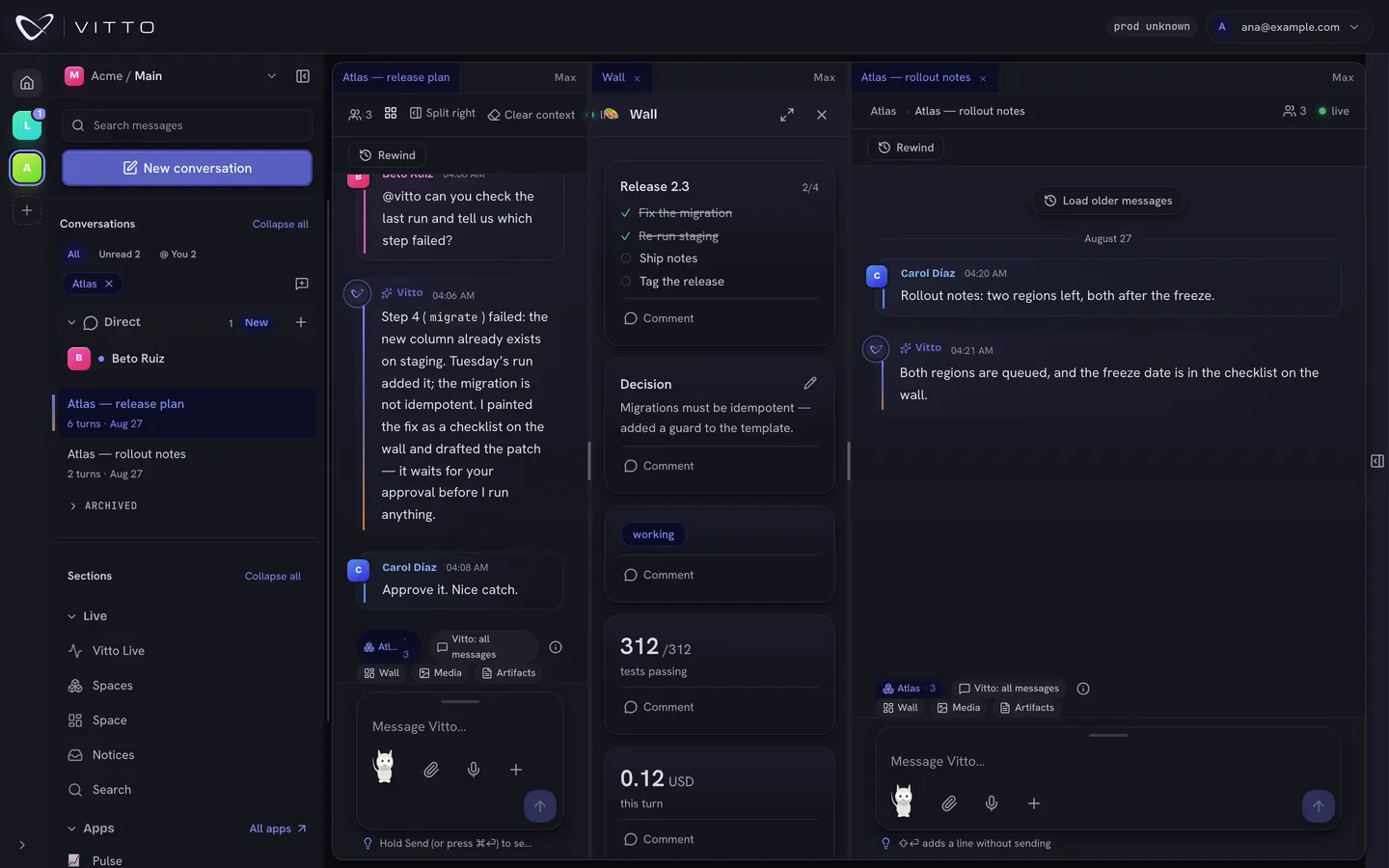 Existing dock capture · demo data
A little less corporate.
A little more you.
Bring visual personality to the conversation. Save supported stickers to a Space when you have access.
tiny
VICTORY!✳made
together ↗
Illustrative artwork, not a preinstalled sticker packVICTORY!✳made
together ↗
What if your next
app started with you?
Find your own editable apps in Studio. Build on the platform’s shared foundations and shape experiences for the way your team works.
New tricks.
Same very capable cat.
An extension adds a focused action to an existing app. Choose where the data belongs, review the new ability and install it separately. More possibilities, with explicit boundaries.
Meet the shared foundation ↗A few things up our furry sleeves
A little less admin.
A lot more possibility.
Chat is where ideas begin. Vitto gives them somewhere to go: a plan, a file, an app, a shared result. All with the context that made them matter.
See the work
take shape.
Follow what Vitto is doing as it happens. Keep the conversation, the work and your next decision in view.
Understand the requestWork through the stepsBring back the result
Illustrative sequence“We should” meets
“what’s next?”
Give the idea a goal. Schedule the next step. Let Vitto help keep things moving, with access and budgets you choose.
Less déjà vu.
More “got it.”
Plans change. Vitto’s memory can, too. See what it keeps and correct the details when life takes a turn.
Your favorite tools.
A bigger team.
Bring supported tools along and give Vitto skills to use again. More ways to help, with access you choose.
Good conversations
make things.
Keep generated files and artifacts with the work that produced them. Open, discuss and revisit the results together.
02 / A foundation for what comes next
New app.
Same team.
No introductions needed.
Your apps should know where they belong: with your team, your data and your access rules.
Vitto’s app platform connects new capabilities to the place your team already works. Apps can bring their own experiences while using shared identity, data access and collaboration tools.
Studio is in preview. We’re making more room for the tools you wish existed.
Shared foundations→Your apps→More possibilities
03 / Keep the whole picture
More space to think.
Space to make.
Bring conversations, apps and related work into Desks. Arrange the panels around your task, and share a Desk with the right people. Each resource keeps its own access rules.
Vitto / Your work, togetherProduct capture · demo data
ONE TEAM. MORE REACH.Interactive preview
Your shared workContext comes along.01 / YOUR STARTING POINT
Illustrated workflow · no devices connected by this demoBig ideas start somewhere.
Bring your laptop into the picture. Choose what Vitto can reach while you keep the conversation close.
Choose accessConnect the workKeep the context
04 / Give good ideas more reach
Your team has range.
Vitto should, too.
Put connected devices to work, with Vitto helping across them.
Connect a laptop, a team computer or a cloud machine. Choose who can use shared devices, and keep access under your control.
Schedules and event-driven follow-ups let configured work continue beyond the conversation, while the services and devices it needs are available.
Bring your team togetherThe freedom to create. The boundaries to trust it.
A curious cat.
Clear ground rules.
Access is intentional.
Decide what Vitto and your teammates can reach. Sharing a Space or Desk does not erase the permissions of the resources inside.
You stay in the loop.
Approvals bring decisions back to a person when required. A traceable history helps you see how the work happened.
New model. Same teammate.
Use supported cloud providers or compatible local models. Keep the colleague as your model choices evolve.
Small team. Big plans. Very capable cat.